SEO.You hear the term all the time, but how do you actually rank higher in the search engines? I know when I first heard the term, it sounded like some voodoo magic that only a few people understood how to use.
The reality is, SEO isn’t rocket science. Some gurus would have you believe it takes years of dedicated study to understand it, but I don’t think that’s true. Sure, mastering the subtle nuances takes time, but the truth is that you can learn the fundamentals in just a few minutes.
So, I got to thinking, "Why don’t I lay out the basics, all in one post?"
It’s a long one, to be sure, but after years of studying SEO and working behind the scenes to help companies get first page rankings, I’m convinced this is all you needto know. If you are looking to boost your traffic so that you can increase your sales, just follow these basic guidelines.
The Traffic Trap (and How SEO Really Works)
Lots of marketers make the mistake of seeing SEO only as a source of free traffic. It’s true, free traffic is the end result, but it’s not how SEO works.
The real purpose of SEO is to help people who are looking for you find you. To do that, you have to match the content on your website to what people are trying to find.
For example:
Mary sells custom knitted sweaters. On her blog, she shows how she makes the sweaters by hand, often talking about the different yarns she uses. There’s not much competition for keywords relating to yarn, and Mary is publishing lots of great content about it, so before long, she has front page rankings for several different types of yarn.
Do you see the potential problem?
The people searching for yarn most likely knit themselves, and it’s unlikely they’ll be interested in purchasing Mary’s sweaters. She’ll get lots of traffic, sure, but none of the traffic will convert, because the visitors have completely different goals.
The lesson here: if you want SEO to work for you, you need to make sure your goals match the goals of your visitors. It’s not about traffic. It’s about figuring out what you want, and then optimizing for keywords that bring in visitors who want the same things.
How do you discover what those keywords are?
Simple: research.
Research: How to Find the Right Keywords
Sure, research is a little tedious, but it’s an indispensable part of finding the right keywords. You want to uncover keywords that:
Have a high search volume (people are looking for the keywords)
Have low competition (smaller amount of results will mean your chances of ranking higher improve)
Are supported by your content (the keywords are relevant to your site).
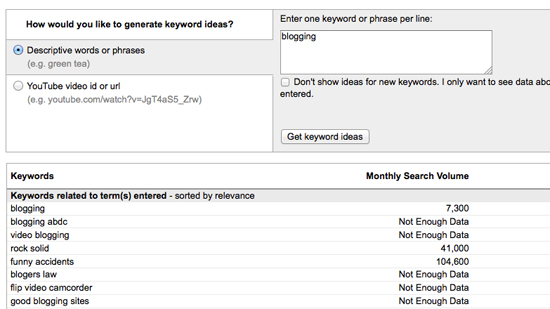
There are lots of tools to aid you in finding the right keywords, the most popular being
Google’s Search-Based Keyword Tool. It provides results based on actual Google searches, and if you are logged into an AdWords account, it will also give you a list of keyword ideas customized to the site on the account.
Before you get too far though, let’s discuss an important concept for deciding how broad or narrow you want your keywords to be. It’s called, "The Long Tail."
The Long Tail
Popularized by Chris Anderson, the Long Tail describes a phenomenon where lots of low traffic keywords can collectively send you more visitors than a few high-traffic keywords.
For example, although Amazon may get thousands of visits from the keyword “DVD,” they get millions of visits from all of the individual DVD titles (i.e., Dark Knight, Toy Story, etc.). Individually, none of those titles get anywhere close to the traffic of a term like, "DVD," but collectively, their volume is a lot larger than any one keyword.
How does the long tail apply to you?
When you combine them all, your long tail (unpopular) keywords should make up roughly 80% of your traffic. So, when you’re researching keywords, don’t just focus on the ones getting massive amounts of traffic. Take note of some of the less popular ones too, and then incorporate them into your overall strategy.
Crafting Your Content
After you pick the right keywords, it’s important to start crafting your content.
Search engines have bots that automatically crawl your website, "reading" it to find out what it’s about and then deciding which keywords each of your pages should rank for. You can influence their "decisions" by strategically optimizing your content for certain keywords.
This is especially true if you’re creating content bots can’t read. It’s easy for bots to interpret text, but they aren’t advanced enough yet to watch videos, look at images, or listen to audio. You’ll need to describe them, so they bot can understand and rank your pages for the appropriate keywords.
One quick word of warning, though.
Writing solely for search engines usually makes your content boring, and typically, that won’t help convert your visitors into customers. It’s far better to focus on people first, making your content as easy as possible, and then optimize for search engine bots where you can, without sacrificing the persuasiveness of your content.
Pay attention to:
- Titles – Create eye-catching titles that raise the reader’s interest. You only have one chance to make a great first impression.
- Keywords – Pick keywords that will help bring people to your site and are relevant.
- Links – Link to quality sites that compliment what your website is about. It’ll encourage sites in your niche to link to you as well.
- Quality – Try to publish unique and quality content. This prompts users to come to your site because they cannot easily find the content elsewhere.
- Freshness – If you are publishing content that does not age or become outdated, that’s great, but you also need to add new content on a regular basis. If you don’t have the time to add content to your website, consider adding a question and answer section or a blog to your website.
And most importantly, do not publish someone else’s content on your site. This creates duplicate content, and search engines can penalize you for it.
Optimizing Your Code
Search engine bots don’t just read your website’s text. They also read your website’s code.
With that in mind, there are eight different sections of your code you need to optimize. To help demonstrate these points, I am going to use examples from zeldman.com and stuffandnonsense.co.uk, two popular web designers that take different approaches in their site markup.
Title Tags
Title tags encase the title of your site. To demonstrate, this is the code from zeldman.com:
<title> Jeffrey Zeldman Presents The Daily Report</title>
Here, Zeldman puts the emphasis on his name and the name of the site. If you wanted to find it in the search engines, you would probably
search for, "Jeffrey Zeldman" or "the Daily Report."
Let’s take a look at the other site:
<title>Fantastic web site design in Flintshire, North Wales from Stuff and Nonsense</title>
Stuffannonsense.co.uk took a different approach. By putting the site name at the end, they emphasize what the website is about. You’d most likely find them by searching for, "web design in Flintshire, North Wales," or a variation thereof.
The bottom line: when coding your title tags, make sure keywords are in the title. To further maximize search engine results, each page should have a unique title tag.
Meta Tags
The main meta tag you should be concerned with is called the, "meta description tag." It doesn’t have much of an impact on your search engine ranking, but it tells visitors what your site is about, so it can have a big impact on whether they decide to click through or not.
Let’s take a look at some examples:
<meta name="description" content="Web design insights since 1995. Personal site of Jeffrey Zeldman, publisher of A List Apart Magazine, founder of Happy Cog Studios, co-founder of The Web Standards Project, co-founder of the Event Apart design conference, author of Designing With Web Standards." />
<meta name="description" content="Looking for fantastic web site design in North Wales? Stuff and Nonsense are world renowned web designers based in North Wales." />
Can you spot the keywords Zeldman.com and stuffandnonsense.co.uk emphasize?
Zeldman was very thorough by mentioning his other projects. If you do a Google search for "Zeldman," zeldman.com comes up first. Happy Cog and A List Apart also show up. If you have multiple online interests, you might want to take Zeldman’s approach and keyword them in the description meta tag.
Stuff and Nonsense emphasizes the type of visitor who should visit their site. By asking the question, "Looking for fantastic website design in North Wales?" they make it crystal clear that it’s a site built for people looking for web design. If you’re one of those people, it would probably stand out to you.
When creating meta tag descriptions, make sure your keywords are in your description, using full sentences. Don’t make the description too long, though, or it might get cut off. If possible, also try to make each page have a unique meta description.
Headings
These are very similar to headings in a book, but these come in a specific order. H1, H2, H3, H4, and so on, with H1 starting the page as the main heading. The remaining heading codes descend to lower level headings on the site.
For example:
<h1>How to Optimize Your Business for Search Engines</h1>
<h2>The ABCs of SEO</h2>
<h3>Research</h3>
Note the pattern. The more specific your content becomes, the higher the number of the heading.
Generally, there should only be one H1 tag on each page, and you can have as many h2s, h3s, and h4s as needed. Also, make sure your headings contain keywords and are relevant to the content on your website.
Sitemaps
Sitemaps are like a roadmap for search engines. They give bots directions to all of the different pages on your website, making sure they find everything.
There are two types of sitemaps you can create: HTML sitemaps and XML sitemaps. The main difference is XML sitemaps are coded specifically for search engines to read, while HTML sitemaps are easy for people to read too. You can link to them, giving the visitor an overview of everywhere they go.
If you have less than a few hundred pages, you should place a link to each page in your HTML sitemap. If your web site has a few thousand pages or more, just link to the most important pages.
XML sitemaps, on the other hand, contain every page of your web site, even if your web site has a million pages. You can use tools like the
XML Sitemap Creator to automatically create a sitemap for you. Once your XML sitemap is created, you then want to submit it to
Google Webmaster Central and Bing so that the major search engines can crawl and index your web site.
Domain Name
Domain names that contain keywords within them rank a lot higher than domains without keywords. Exact match domain names rank even higher.
But there’s a cost: exact match domains aren’t very unique. The reason why you see many companies use made-up words for their domain name is you can build a brand around it, instead of fighting the existing meaning.
Which is better?
It depends.
If your traffic comes purely from search engines, then using an exact match domain name may be a smart decision for you. For example Diamonds.com and Hotels.com will always rank well for “diamonds” and “hotels” because their domain name is keyword rich.
If SEO is only a small part of your strategy, however, go with something more unique. A decade ago, no one was searching for "Google," but now it’s a huge brand. The same goes for sites like Zappos and Zillow.
URL Structure
URLs are another important but often overlooked part of SEO.
If your URLs are messy, search engines will have a hard time crawling them, and if search engines have a hard time crawling them, they will not be able to index your site, which means you will not rank in the search engines.
Keep these factors in mind to make your URLs more search engine friendly:
- URLs should not contain extraneous characters ( $ @ ! * % = ? )
- Shorter URLS typically rank better than longer ones
- Numbers and letters should only be used in URLs.
- Do not use underscores. Search engines prefer dashes.
- Sub-domains can rank better than sub directories.
Site Structure
The way you link web pages together will make a big impact on your rankings. Here are some tips when cross-linking your web site:
- Links within your content tend to carry more weight than links within a sidebar or footer.
- Try to keep the number of links on each page under 100.
- No-follow outgoing links that are not relevant (do not have quality content). For example, links to a Feedburner page.
Other SEOs also talk about no-following internal links, such as to their terms of service, but
pagerank sculpting does not work anymore. If you want to block pages such as your terms of service, the best way to do this is to exclude it in your
robots.txt file.
Alt Tags
For search engine bots to properly index images, alt tags need to be added to each image, adding a brief description. For example, if there was an image of a “blue widget”, I would tell the search engine that the image is a blue widget by using an alt tag. It would look something like this:
<img src=”http://quicksprout.com/images/bluewidget.jpg” alt=“blue widget” />
In addition, make sure your image names are relevant to the image. The picture of the blue widget would be called bluewidget.jpg instead of image3.jpg.
Links
Links are maybe the most important part of SEO. The more web sites that link to your web site, the higher your web pages will rank.
The reason links have a high value in SEO is that it is easy for anyone to do research, modify their content, or create content, but is hard to convince hundreds or thousands of web sites to link to you. In the eyes of a search engine, the more trustworthy, non-spammy sites are linking to you, the more authority you must have on the topic.
Before we get into how to build links, here are some things you need to know. In general:
- Links within content are more effective than links in a sidebar or footer
- Links from related sites are better than links from non-relevant sites
- Anchor text plays the most important role in link building. If you want to rank for “blue widget” then you want the anchor text of the link to be “blue widget”.
Here are some things to avoid:
- Links from spammy or irrelevant sites.
- Site wide links can hurt more than they may help.
- If all of your links are rich in anchor text, it can hurt you.
- Reciprocal links (I link to you and you link to me) are not too effective.
- If you buy text links and get caught, you can get banned from a search engine.
Here are a few ways you can increase your link count:
- Social media – getting on sites like Digg or StumbleUpon don’t just drive a ton of traffic. The increase in visibility also improves your chances of getting linked to.
- Directories – There are many directories on the web. Take the time to submit your web site to the ones that compliment your content.
- The top 100 – If you want to rank for a specific keyword, the best links you can get are from sites that already rank in the top 100 search results for that keyword. Granted, some of the sites that rank for the term you are trying to rank for are your competitors, so they will not link to you, but some will not be your competition and you can always shoot them a nice email asking them to link to you.
- Forums – Many forums allow you to create signatures, in which you can link back to your web site. As long as those links are not no-followed, they will help with your rankings.
- Competition – The easiest way to get links is to see who links to your competition and write them an email telling them the benefits of your web site compared to your competition. Roughly, 5% of the web sites you email will also add your link.
- Dead links – There are billions of links on the web, so expect a good portion of those links to die over time. Web sites go down and many of the links pointing to that web site are still active. If you email those web sites informing them of the dead link, and that your content is similar, there is a good chance they will replace the dead link to one going to your website.
Conclusion
If you implement all of the advice here, your traffic from search engines will increase.
Just be patient. It takes time for search engines to update their records, as they have to crawl billions of websites.
Also, note that it will take time to figure out what works for your site. What works for site A might not work for site B. There aren’t any shortcuts. If you do anything shady to speed things up, eventually you will get caught and punished. It’s never worth it.
A better approach?
- Figure out what people are looking for
- Create a site that gives it to them
- 3. Optimize for search engines, so they help people find you
It’s not just smart SEO. It’s what search engines want you to do.
Ultimately, their goal is to have the best websites for every given topic show up at the top. So if you work hard to create the best website, and then promote it effectively, eventually they will catch up.
Just keep the above points in mind to help guide you. It takes time, and it’s a lot of hard work, but if you stick with it, it does pay off.